
Text Formatting Elements
Text Formatting Elements
1. What Are Text Formatting Elements?
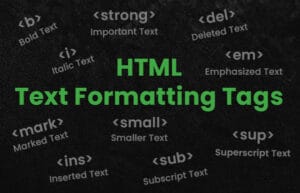
Before you dive into adding pictures or videos to a website, you first need to learn how to format your text properly. Text formatting elements in HTML help you structure, highlight, and organize your content so that it’s easy to read and visually appealing.
2. Paragraphs and Line Breaks
A paragraph is a block of text. Every time you start a new idea or topic, you should wrap it in a <p> tag. If you want a short line break without starting a new paragraph, use <br>.
					<p>This is a complete paragraph with its own idea.</p>
<p>This is another paragraph.</p>

<p>This is a sentence.<br>This part appears on a new line.</p>
3. Headings: h1 to h6
Headings organize your page like a book: <h1> is your main title, and <h2> to <h6> are section and subsection titles. They also help with SEO (Search Engine Optimization) and accessibility.
Only use one h1 per page, and use the other levels to create a logical structure.
					<h1>Main Title</h1>
<h2>Section Heading</h2>
<h3>Subsection Heading</h3>
4. Bold and Italic Text
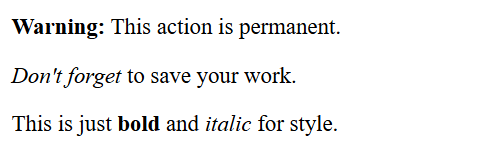
You may want to emphasize some parts of your text. HTML lets you make words bold or italic for emphasis or style. But not all tags have the same meaning — some are just for style, others add semantic meaning (important for screen readers and SEO).
Use:
-
<strong>for important text (bold + meaningful) -
<em>for emphasis (italic + meaningful) -
<b>for visual bold -
<i>for visual italic
					<p><strong>Warning:</strong> This action is permanent.</p>
<p><em>Don't forget</em> to save your work.</p>
<p>This is just <b>bold</b> and <i>italic</i> for style.</p>
5. Underline and Highlight
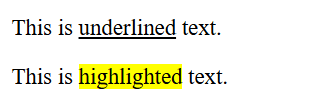
Underlining and highlighting are useful when you want something to stand out, just like with a pen or highlighter. Use these effects sparingly to avoid confusing the reader.
-
<u>creates underlined text (can be mistaken for a link). -
<mark>highlights text (like with a yellow marker).
					<p>This is <u>underlined</u> text.</p>
<p>This is <mark>highlighted</mark> text.</p>
6. Horizontal Line hr
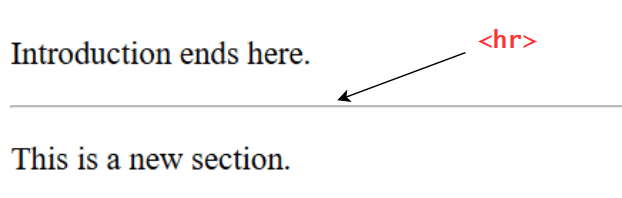
Sometimes you want to visually separate sections of your content. The <hr> tag draws a horizontal line across the page. It’s a nice way to divide different sections.
					<p>Introduction ends here.</p>
<hr>
<p>This is a new section.</p>
7. Quotation Tags
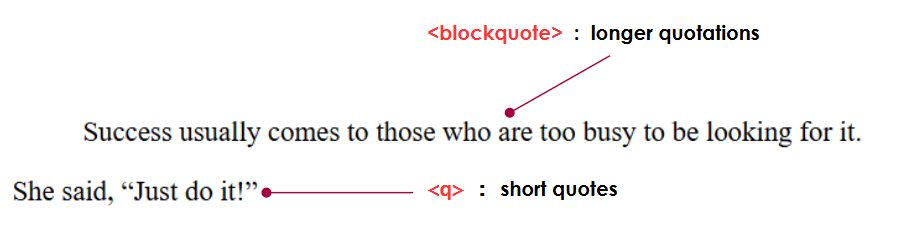
Whether you’re quoting someone famous or showing a short quote in a sentence, HTML has special tags for that.
-
<blockquote>is for longer quotations in their own block. -
<q>is for short quotes inside a sentence.
					<blockquote>
Success usually comes to those who are too busy to be looking for it.
</blockquote>

<p>She said, <q>Just do it!</q></p>
8. Code and Monospaced Text
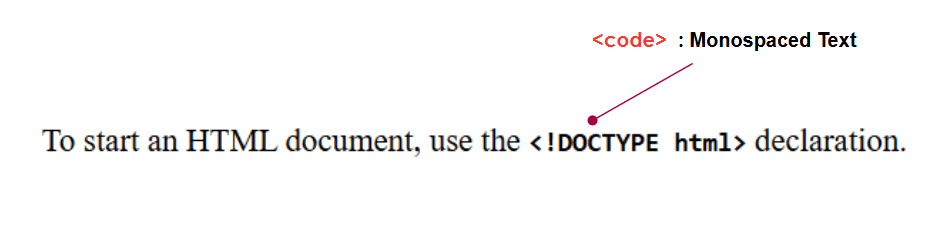
When you want to show a piece of code or a file name in your webpage, use the <code> tag. It displays the content in a monospaced font (where all characters have the same width), which is easier to read for code.
<p>To start an HTML document,
use the <b><code><!DOCTYPE html></code></b> declaration.</p>
9. Superscript and Subscript
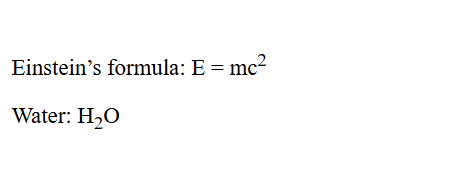
These are used in math formulas, scientific notations, or footnotes.
- Superscript puts text above the line (like exponents).
- Subscript puts text below the line (like chemical formulas).
					<p>Einstein’s formula: E = mc<sup>2</sup></p>
<p>Water: H<sub>2</sub>O</p>
10. Summary Table
| Tag | Purpose | Example |
|---|---|---|
<p> |
Paragraph | <p>Text</p> |
<br> |
Line break | Line 1<br>Line 2 |
<h1>–<h6> |
Headings | <h1>Title</h1> |
<strong> |
Bold + meaning | <strong>Important</strong> |
<b> |
Bold (visual) | <b>Bold</b> |
<em> |
Italic + meaning | <em>Emphasis</em> |
<i> |
Italic (visual) | <i>Italic</i> |
<u> |
Underline | <u>Underlined</u> |
<mark> |
Highlight | <mark>Marked</mark> |
<hr> |
Divider | <hr> |
<blockquote> |
Long quote | <blockquote>Quote</blockquote> |
<q> |
Short quote | <q>Quote</q> |
<code> |
Code text | <code>print()</code> |
<sup> |
Superscript | x<sup>2</sup> |
<sub> |
Subscript | H<sub>2</sub>O |
11. Practice Example
					<!DOCTYPE html>
<html>
  <head>
    <title>Text Formatting Example</title>
  </head>
  <body>
    <h1>About Me</h1>
    <p>Hello! My name is <strong>Sarah</strong> and I’m learning <em>HTML</em>.</p>

    <p>I love:</p>
    <ul>
      <li><mark>Reading</mark></li>
      <li><u>Coding</u></li>
      <li><i>Traveling</i></li>
    </ul>

    <hr>

    <p>Here’s a math formula: E = mc<sup>2</sup></p>
    <p>Water formula: H<sub>2</sub>O</p>

    <p>Quote: <q>Practice makes perfect.</q></p>
  </body>
</html>

Text formatting elements in HTML allow you to make your content clear, organized, and visually engaging. Whether you’re writing a heading, emphasizing a word, adding quotes, or showing a formula — these tags give your page structure and meaning.
By using the right tags like <p>, <strong>, <em>, <h1>–<h6>, <br>, and others, you improve both the readability and accessibility of your content — making your webpages more user-friendly and professional.
-
What’s the difference between
<strong>and<b>? -
Which tag do you use for a short quote inside a paragraph?
-
How do you write the chemical formula for water?
-
What does
<hr>do?
Q1: What’s the difference between <strong> and <b>?
👉 <strong> makes text bold but also adds semantic meaning (“this text is important”), useful for screen readers and SEO.
👉 <b> makes text bold only for visual purposes, with no extra meaning.
Q2: Which tag do you use for a short quote inside a paragraph?
👉 The <q> tag.
Example: <p>She said, <q>Hello!</q></p>
Q3: How do you write the chemical formula for water?
👉 Use the <sub> tag for the number 2, because it’s a subscript. Example : H<sub>2</sub>O
Q4: What does <hr> do?
👉 <hr> creates a horizontal line (a divider) to visually separate content.
Example:
<p>Introduction</p>
<hr>
<p>Next section</p>